Javascript 문제 해결(JSON, 가져오기) Quote json에서 임의 출력
json에서 임의로 데이터를 불러와서 출력해 봅시다.
문제 번호 1
JSON 데이터를 가져온 후 콘솔 창에 결과를 표시해 보십시오.
목표는 가져온 데이터가 어떻게 구성되어 있는지 살펴보는 것입니다.
fetch("json/dummy01.json")
    .then((res)=> res.json())
    .then((obj) => {
        console.log(obj);
    });
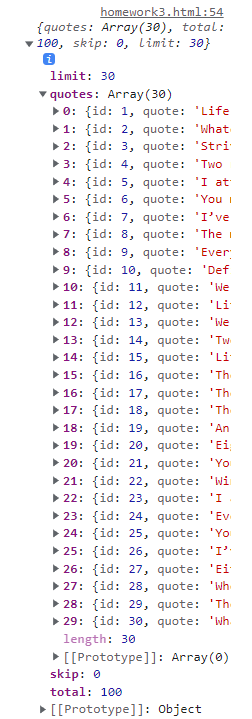
콘솔 창에 표시되는 json 데이터입니다.
문제 번호 2
JSON 데이터에서 하나의 인용문을 가져와 내용과 말한 사람을 표시합니다.
임의의 숫자를 사용하여 인용문을 가져온 다음 인용문을 화자로 나누어 화면에 표시합니다.
<!DOCTYPE html>
<html lang="en">
<head>
    <meta charset="UTF-8">
    <meta http-equiv="X-UA-Compatible" content="IE=edge">
    <meta name="viewport" content="width=device-width, initial-scale=1.0">

    <title>Document</title>

    <style>
        @import url('https://webfontworld.github.io/Montserrat/Montserrat.css');
        * {
            padding: 0;
            margin: 0;
        }
        #wrap {
            width: 800px;
            height: 500px;
            background-color: #101010;
            text-align: center;
            color: #fff;
            font-family: "Montserrat";
        }
        .button {
            display: inline;
            padding: 5px;
            background-color: #2f00ff;
            border-radius: 10px;
            color:#fff;
            cursor: pointer;
        }
        .say {
            height: 40%;
            font-size: 1.5vw;
            padding: 120px 50px 50px 50px;
        }
        .name {
            height: 60%;
            font-weight: bold;
        }
    </style>
</head>
<body>
    <div id="wrap">
        <div class="button">
            <span>click</span>
        </div>
        <div class="say">
            <span></span>
        </div>
        <div class="name">
            <span></span>
        </div>
    </div>
</body>

<script>

    //선택자
    const say = document.querySelector(".say span");
    const name = document.querySelector(".name span");
    const button = document.querySelector(".button");
    let random = Math.round(Math.random()*30);  //랜덤숫자 0~30

    fetch("json/dummy01.json")
        .then((res)=> res.json())   //json파일 읽어오기
        .then((obj) => {            //읽어온 데이터를 json으로 변환
            data = obj.quotes;      //json에 있는 quotes만 받아오기

            say.innerText = data(random).quote;             //처음 보여주기용 명언
            name.innerText = "- " + data(random).author;    //처음 보여주기용 이름

            button.addEventListener("click",()=>{           //button 함수부여
                random = Math.round(Math.random()*30);      //버튼 누를때마다 숫자 재부여

                say.innerText = data(random).quote;         //새로운 숫자달고 명언
                name.innerText = "- " + data(random).author;//새로운 숫자달고 이름
            })
        });

</script>
</html>
HTML에서 “say”, “name”, “button” 클래스가 있는 요소는 JavaScript에서 선택됩니다.
무작위의 변수에 0에서 30까지의 임의의 정수를 저장하십시오!
술책() 함수를 사용하여 “dummy01.json” 파일을 읽습니다.
.그 다음에() 메서드를 사용하여 응답 데이터를 JSON으로 변환합니다.
변환된 JSON 개체에서 견적 데이터는 “quotes” 배열에 저장됩니다. 데이터 변수에 저장합니다.
단추 요소에 클릭 이벤트를 추가합니다. 버튼을 클릭할 때마다 0에서 30까지의 새로운 임의의 정수가 임의의 변수에 할당되고 data(random)는 새로운 말과 저자를 선택하는 데 사용되며 say 및 name 요소는 각각 업데이트됩니다.
이렇게 하면 버튼을 누를 때마다 새로운 무작위 인용문과 작성자를 표시하는 간단한 인용문 웹 페이지가 생성됩니다!